
5Code Loadouts
Stop treating the police armory like a static shop menu. 5Code Loadouts turns equipment deployment into a complete tactical workflow with unit-specific kits, bank deposits, returns, penalties, supervisor controls and full activity logging. Built for QBCore, QBox and ESX, it gives departments a much more structured way to manage duty equipment.
From armory checkout to return — every loadout becomes part of the department workflow.
5Code Loadouts is designed for police departments that want something more structured than unrestricted item access. Officers receive pre-built equipment kits from an in-game armory NPC, while supervisors control loadouts, permissions and activity through a dedicated management interface.
Patrol, K9, SWAT, Task Force or Special Operations can each receive their own equipment profile — while deposits, returns and activity records run automatically in the background.
// ARMORY_DEPLOYMENT_ACTIVE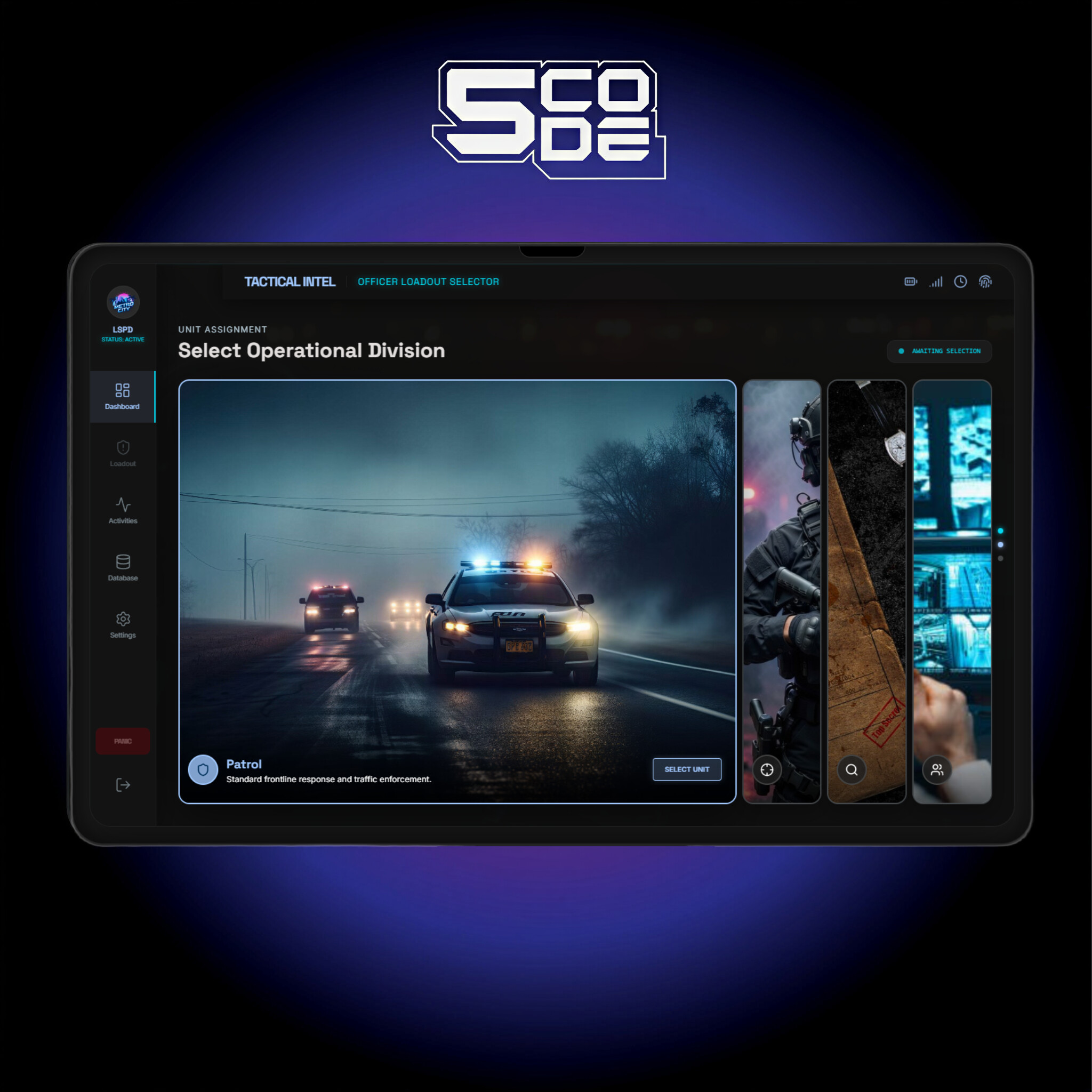
Give every unit the equipment it needs without turning the armory into free-for-all inventory.
Unit-Specific Loadouts
Create ready-to-deploy kits for different police roles so officers can receive equipment appropriate to their assigned unit directly from the armory NPC.
Deposit-Based Equipment Checkout
Deploying a loadout automatically charges a configurable-style deposit from the officer's bank account, adding financial consequence to issued department equipment.
Automatic Return Processing
When issued equipment is returned correctly, the deposit can be refunded automatically. Missing or damaged items can trigger the penalty behavior described by the resource.
In-Game Armory Interaction
Officers retrieve their approved equipment through an in-game armory NPC instead of relying on manual admin distribution.
VIP & Equipment Overrides
VIP officers can receive specialized loadouts, while equipment-level overrides allow extra flexibility inside standard kits.
One Active Loadout per Officer
The database enforces one active deployment per officer, helping prevent duplicate loadout checkout across ongoing duty sessions.
Issue gear like department property — not disposable inventory.
The deposit workflow adds accountability to equipment deployment without requiring supervisors to manually track every checkout.
Officer Selects a Loadout
The officer accesses the armory and selects an available kit based on their role, permissions or unit assignment.
Bank Deposit Is Charged
The system automatically takes the equipment deposit from the officer's bank account when the loadout is deployed.
Equipment Is Checked Back In
Returning the issued equipment completes the workflow, allowing the resource to process the refund or applicable penalty.
Department leadership gets a control center instead of another config-only workflow.
Supervisors can manage the system through an in-game administration interface with dashboard statistics, loadout editing, settings and activity monitoring.
The supplied resource description also includes role assignment, custom loadout creation and request approval controls, allowing department leadership to manage access without constantly editing files outside the game.
Live Dashboard
View system activity and management information through a dedicated in-game dashboard.
Loadout Editor
Create, change or remove department equipment kits without treating every adjustment as a manual database task.
Supervisor Controls
Assign appropriate access and manage requests through the same management workflow.
Dual Activity Logging
Actions are recorded inside FiveM and can also be mirrored to Discord, giving departments a clearer audit trail outside the game.
QBCore, QBox or ESX — keep the armory workflow consistent across frameworks.
Framework detection can be configured through
Config.Framework = 'auto', while support for several
popular inventories and notification systems gives the script more
flexibility inside existing servers.
- Frameworks
- QBCore / QBox / ESX Multi-framework support with automatic framework detection available through configuration.
- Inventory
- 3 Systems qb-inventory, ox_inventory and codem-inventory.
- Notifications
- Multi-Bridge qb, ox_lib, codem-notification and ESX notification support.
- Database
- oxmysql Required database layer; the supplied resource information states that tables are created automatically on first start.
- Code access
- Escrow Protected Main code is not accessible and is protected with Cfx Asset Escrow.
- Subscription
- No The resource is not listed as subscription-based.
Make equipment deployment feel like part of police RP instead of background inventory management.
Patrol Deployment
Give regular patrol officers a standardized kit that can be issued and returned through the department armory.
Specialized Unit Kits
Separate tactical and specialist equipment from ordinary patrol loadouts so unit assignment has a real gameplay impact.
Command Oversight
Supervisors gain visibility into who deployed equipment and what activity occurred through the management and logging systems.
Less Manual Tracking
Deposits, active loadout state and logs are handled by the resource, reducing the need for staff to track routine equipment checkout manually.
See the system in action and review the setup before deployment.
A serious police department should know who took the gear, what they deployed with and whether it came back.
5Code Loadouts combines unit-based police equipment, automated deposits, return processing, supervisor controls, database enforcement and Discord logging into one structured armory system for QBCore, QBox and ESX servers.