
Design the Shirt. Wear It Five Minutes Later.
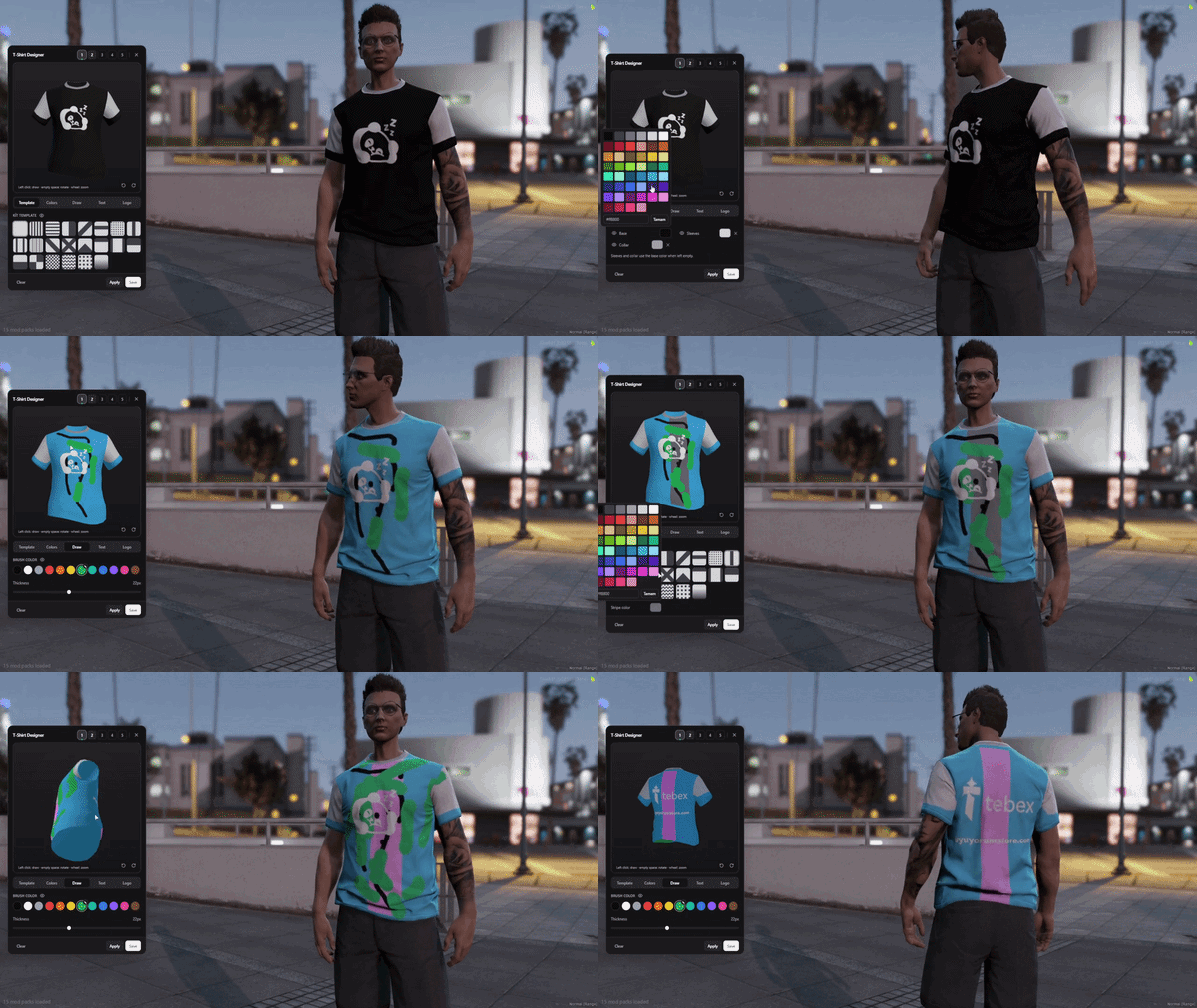
Forget uploading a texture, restarting the resource and opening Photoshop because somebody wanted their crew logo two centimeters lower. UM T-Shirt Designer puts the whole design studio inside FiveM. Paint directly on the shirt, throw on a logo, add text, change colors, rotate the model and watch the result appear on your character while you're still editing it.
Your players get the fun part. Your staff gets fewer “can you make me this shirt?” tickets.
UM T-Shirt Designer moves clothing creativity out of external tools and directly into gameplay. A player can start with a template, change individual shirt zones, import a logo, write custom text or simply paint over the real shirt model using the built-in brush.
Crew merch. Football kits. Business uniforms. Event shirts. Dumb inside jokes printed across somebody's back at 3 AM. Once players can build clothing themselves, they will absolutely find reasons to use it.
// PHOTOSHOP HAS LEFT THE CHATYou're painting the actual GTA shirt mesh while looking at it in 3D.
Rotate it. Zoom in. Draw directly where you want it.
The design studio uses the real shirt mesh inside a 3D viewport. Players can use the brush, rotate the model, zoom closer and see each change reflected on their character in real time. No export step. No guessing how a flat texture will wrap around the body.
Paint Straight Onto the Shirt
Use the built-in brush to draw directly on the garment. What you see in the editor is tied to the shirt itself, so designing feels closer to customizing an object than editing a mystery texture file.
Check the Whole Shirt
Rotate around the model and zoom into smaller details instead of discovering after purchase that the best part of the logo somehow ended up under somebody's armpit.
See It on the Character Immediately
Changes appear on the player's character while designing, cutting out the usual loop of edit, save, reload, check, hate it, repeat.
Addon Shirts Are Detected Automatically
The system supports separate male and female shirt setups and can automatically detect the addon shirts used for each gender.
Pick a layout, hit it with your colors and you've already got the bones of a proper kit.
Base color, sleeves and collar can be handled independently with palette controls and hex input. Don't want one of the design layers? Turn it off instead of rebuilding the whole shirt.
// START FAST · TWEAK EVERYTHINGImport logos, write whatever you want and move everything around like actual design objects.
Bring Your Own Logo
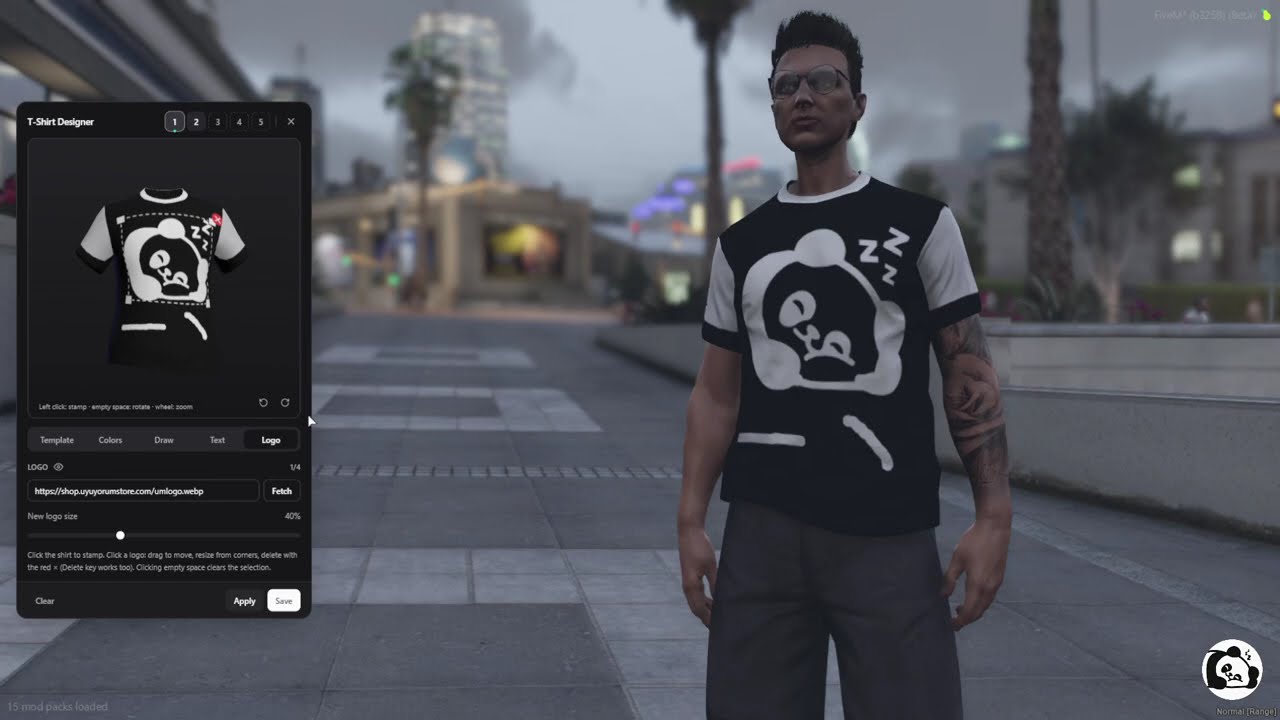
Load a logo from an image URL and place it on the shirt as an object. Great for businesses, teams, crews, communities and that one guy who absolutely needs his Discord avatar on a T-shirt.
Move It Until It Looks Right
Logos can be dragged, resized from the corners and deleted without rebuilding the entire design.
Four Logos Per Design
Each shirt can store up to four logo objects, with their placement restored when the design is loaded again.
Write on the Shirt Too
Add custom text using five built-in fonts, choose the color and size, then move or resize it like any other design object.
Changed Your Mind? Edit It.
Existing text can be updated live, including wording and font, without deleting everything and starting again.
One Tool, Lots of Merch
Football shirts, company uniforms, faction clothing, race-team kits, event merch or custom community shirts can all come from the same editor instead of separate clothing packs.
Every character gets a small personal wardrobe of saved designs.
Save it now. Come back and ruin it creatively later.
Each character gets five design slots by default. Players can switch between saved shirts, reopen an existing design for editing and choose which one is currently worn. Saved design data is restored on login and character switching.
Designs sync to nearby players without trying to keep every custom shirt in the city rendered forever.
Other Players See the Design
Custom shirts are synchronized to nearby clients automatically, turning the editor into an actual multiplayer clothing system rather than a local-only visual trick.
Render What's Around You
Clients focus on nearby visible designs instead of trying to hold every custom shirt on the server at once.
Walk Away, Free the Resource
Designs belonging to players who leave the relevant range can be released client-side instead of hanging around unnecessarily.
Control the Visible-Design Budget
Sync range and visible-design limits are configurable so server owners can tune the system around their own environment.
Current release: 20 simultaneous visibility channels.
In the current Early Access build, up to 20 players server-wide can wear custom designs visibly at the same time. This is a simultaneous visibility limit, not a limit on the total number of designs stored across the server. The developer states that the channel count will increase as the included clothing pack expands in future updates.
Designs come back with the character instead of disappearing with the session.
Shirt layouts, layers, logos and text objects are stored through
oxmysql and restored when the character returns.
Database tables are also created and migrated automatically when the
resource first starts.
The framework bridge handles character identity and load/unload events, with automatic detection available for QBox, QBCore and ESX setups. Prefer standalone? That's supported too.
// DESIGN SAVED · DRIP PRESERVEDTune the camera, wardrobe size, sync distance and clothing setup without digging through the whole resource.
Control the Design View
FOV, distance, offset and depth-of-field behavior are configurable, letting you tune how the shirt is presented during editing.
Change Wardrobe Capacity
The default five-slot wardrobe count can be adjusted if your server wants more or fewer saved designs per character.
Decide How Far Designs Matter
Nearby synchronization range and the visible-design budget are configurable from the resource settings.
Translate the Interface
Built-in localization uses the ox_lib locale system, so
the UI can be translated for your own community.
Multi-framework support, persistent storage and only two listed dependencies.
- Frameworks
- QBox / QB / ESX / Standalone Supports qbx_core, qb-core, ESX and fully standalone operation.
- Framework Detection
- Auto / Manual Framework can be detected automatically or configured manually.
- Requirements
- ox_lib + oxmysql These are the two listed resource dependencies.
- Storage
- Persistent Designs, layers, logos and text objects are stored in the database and restored on character load.
- Database Setup
- Automatic Tables and migrations are handled automatically on first start.
- UI Stack
- Svelte 5 + three.js Built with Vite, Svelte 5, Tailwind and three.js.
- Code Access
- Editable Files The listing states that only editable files are accessible.
- Approx. Lines
- ~3,300 Approximate line count supplied in the release information.
- Subscription
- No No recurring subscription is listed.
- Support
- Yes Developer support is listed as available.
Watch the design happen in real time, then decide how long your players are going to spend making shirts instead of roleplaying.
Stop treating every custom shirt like a development request.
UM T-Shirt Designer gives players a proper in-game creative studio with live 3D editing, 22 kit templates, independent color zones, custom logos, editable text, wardrobe slots, persistent database storage and multiplayer synchronization — all while supporting QBox, QBCore, ESX and standalone servers.