
Persistent Weapon Wheel for FiveM
Keep player loadouts available across reconnects, deaths and server restarts. This free standalone FiveM weapon wheel script preserves weapons, ammunition and supported attachments without requiring ESX, QBCore, QBox or another framework.
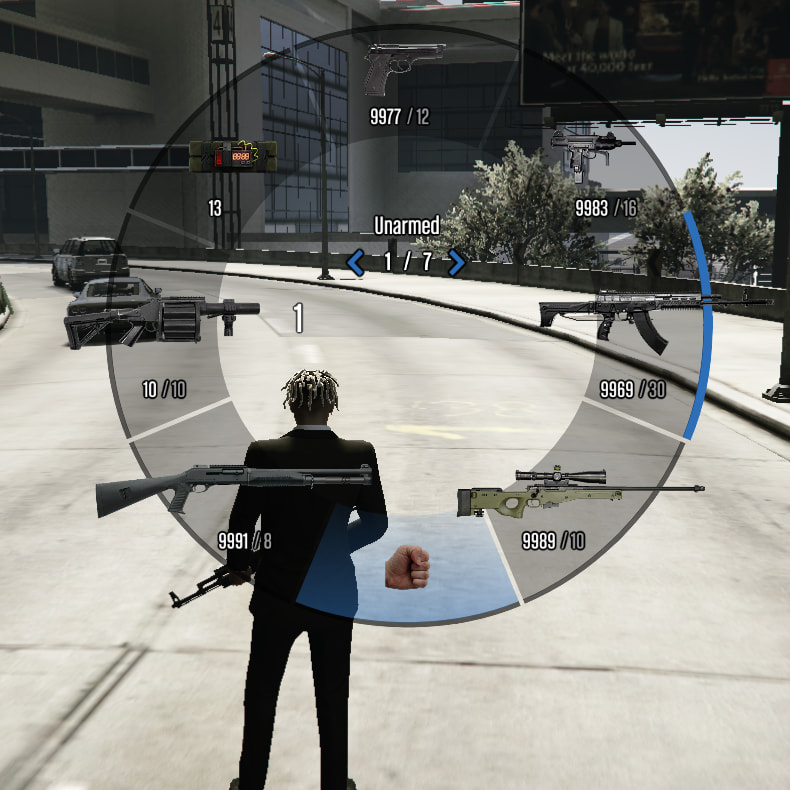
Stop rebuilding the same loadout after every restart.
The script adds persistence to the familiar FiveM weapon wheel. Players can return to the server with their previous equipment still available, helping character inventory feel continuous between sessions.
Persistent Weapons
Player weapons remain saved when they disconnect and return later or when the entire server restarts.
Ammo Preservation
Stored loadout data includes ammunition, helping players return with the same equipment state they previously had.
Attachment Support
Supported weapon components, including attachments such as scopes or suppressors, remain connected to the saved loadout.
Standalone Operation
No ESX, QBCore or QBox installation is required. The resource is designed to run without an additional framework dependency.
Open the wheel, select the equipment and return without starting over.
-
Open the weapon wheel Press
Yby default, or assign another control through the supplied configuration. -
Select the required weapon Move through the configured selection using a familiar radial weapon-wheel experience.
-
Leave or restart the server The resource preserves the player's saved weapon loadout across reconnects and complete server restarts.
-
Return with the loadout intact Weapons, ammunition and supported attachments remain available instead of requiring the player to rebuild everything manually.
Control the wheel without rewriting the resource.
The supplied configuration allows server owners to change the wheel key and manage which weapons are available without editing the main script logic.
Add, remove and organize the available equipment.
Use the configuration file to tailor the wheel to your server's gameplay. Keep the default Y binding or replace it with another control, then manage the weapon entries around your own roleplay rules.
Config.OpenKey = 'Y'
Config.Weapons = {
'WEAPON_PISTOL',
'WEAPON_SMG',
'WEAPON_CARBINERIFLE'
}
A focused weapon system without extra dependencies attached.
The resource is presented as lightweight and standalone. That makes it suitable for servers that need persistent weapon-wheel behavior without installing a complete inventory or framework package solely to gain that feature.
No ESX
The resource does not require an ESX installation to provide its persistence functionality.
No QBCore
QBCore is not listed as a dependency, allowing the script to operate outside that framework.
No QBox Requirement
The script can be used without adding QBox or converting the resource to a framework-specific structure.
Accessible Code
The supplied release information states that the resource code is accessible and the script is not subscription-based.
Everything important before adding it to your server.
Add the resource, configure the wheel and test the persistence.
-
Add the resource Download the free package and place its resource folder inside your server's
resourcesdirectory. -
Start the folder Add
ensure your_resource_foldertoserver.cfg, replacing the placeholder with the actual downloaded folder name. - Configure and test Review the supplied configuration, restart the server and confirm that weapons, ammunition and attachments persist correctly.
What to know before installing the script.
Does the weapon wheel require ESX, QBCore or QBox?
No. The supplied release describes the resource as fully standalone with no framework dependency.
What information remains persistent?
The script is designed to retain player weapons, ammunition and supported weapon attachments across reconnects and server restarts.
Can the weapon-wheel key be changed?
Yes. The default control is Y, and the release states that server owners can change the assigned key.
Can weapons be added or removed?
Yes. The available weapon selection can be managed through the supplied configuration without editing the core script logic.
Is the script really free?
Yes. The release is listed as free and can be obtained from the seller's free-scripts category.
Is the code accessible?
Yes. The technical information supplied with the release lists code access as available and confirms that the resource is not subscription-based.
Give player loadouts continuity between every session.
Add persistent weapons, ammunition and attachments without installing an entire framework. Configure the selection, choose the control and let players return with the equipment their character already owned.
Original release: View the Cfx.re topic